

NOL Card Balance Check In Dubai, the Nol Card is a practical and effective way to use public transit. Besides advice on minimizing travel costs, knowing how to check your NOL card balance is important for smooth traveling. This article is a complete guide on checking NOL card balances, addressing the most frequently asked questions, and providing solutions.
A NOL Card: What Is It?
The Roads and Transport Authority (RTA) of Dubai issues the NOL Card, a smart card that enables users to pay for public transit,
| Dubai Metro |
| Buses |
| Water taxis |
| Trams |
It comes in various types, such as Silver, Gold, Blue (Personalized), and Red Ticket, each catering to different travel needs and preferences.
NOL Card Balance Check
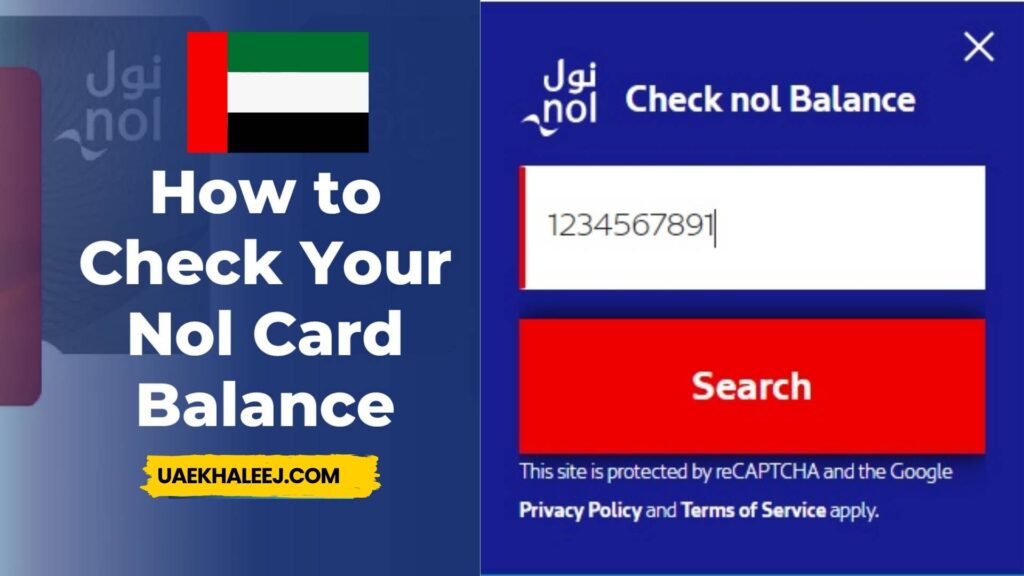
Checking your NOL card balance online is easy.
Just go through the following steps:
Check out the [RTA NOL Card Portal](https://www.rta.ae).
Log in to the RTA account or register if it is your first time.
Fill in the form with your NOL card information.
Hit the “Check Balance” button to see your remaining balance on the card.
This method is convenient to get updates about your balance through your home or while roaming.
The Best Apps in Dubai for NOL Card Balance Check
NOL cards have become so easy to manage through mobile applications. These two apps are very popular ones:
RTA Dubai App: Available for checking your balance and topping up as well as checking up on transactions.
S’hail App: Offers journey planning in addition to NOL card management. Both apps are easy to use and are available on iOS and Android and support English and Arabic.
Add Money to Your NOL Card at a Kiosk or Online
Recharge your NOL card to continue traveling without interruption.
Online: Make use of the RTA app or website.
Once you have logged in, choose “Top Up NOL Card.”
Enter your card number and recharge amount.
Use a debit or credit card to complete the transaction.
Kiosk Machine

Visit any metro station or RTA kiosk.
Place your NOL card inside the machine.
On the screen, there is an instruction to top up via cash or card.
Troubleshooting NOL Card Balance Check Issues
Facing errors while checking your balance? Try the following solutions:
Verify whether the card has been properly registered with your RTA account.
For technical assistance, contact the RTA helpline on 800 9090.
Comparing NOL Card Recharge Limits and Balance Alerts
| Card Type | Min Recharge | Max Balance |
|---|---|---|
| Silver Card | AED 20 | AED 1000 |
| Gold Card | AED 20 | AED 1000 |
| Blue Card | AED 30 | AED 5000 |
NOL Card Balance Check Using SMS and Other Alternative Methods
For those without internet access, NOL Card Balance Check uses the SMS service:
Send your NOL card number to 5223.
Get a prompt response with your current balance.
How to Link Your NOL Card to Your RTA Account for Better Balance Tracking
Linking your NOL card to an RTA account makes things more convenient:
Login to the RTA website or app
Go to “Manage NOL Cards” and tap “Link Card.” Enter the card details and accept.
This allows you to monitor balances, review transaction history, and set balance alerts.
Understanding NOL Card Transaction History and Travel Expenses
Accessing your NOL card transaction history helps manage expenses:
Log into your RTA account.
Choose “Transaction History” from the dashboard of your NOL card.
View comprehensive travel and recharging history records.
This feature is perfect for budgeting your daily or monthly travel costs.
Best Practices to Avoid Low NOL Card Balance While Traveling
To prevent travel disruptions:
Enable auto-recharge through the RTA website.
Set up balance notifications in the RTA app.
Regularly check balances, especially before long trips or peak travel hours.
How to Check NOL Card Balance Without Internet Access
In case of no internet, the NOL Card Balance Check:
Visit any RTA ticket machine or metro station.
Use the SMS service mentioned earlier.
These methods ensure you’re always informed, even offline.
What to Do When Your NOL Card Shows the Wrong Balance
1. Sign in to your RTA account and check your transaction history.
2. In case you still have some issues, head to an RTA customer service center.
3. Raise a complaint with your NOL card number for the RTA to investigate.
Checking NOL Card Balance for Tourists and Visitors
Tourists can use Red NOL cards for short-term travel. To check balance:
Visit any metro station machine or counter.
Use the RTA website for online inquiries.
Impact of NOL Card Balance on Public Transport Access
A low NOL card balance can block the gates of public transport. Therefore, it is always essential to maintain a minimum balance of AED 7.50 in order not to be stranded.
Using the above information in this guide, you can efficiently manage your NOL card to avoid any problems in traveling within Dubai without stress. You can consult the official website of RTA or its helpline for further help.
Why Track NOL Card Transaction History?
There are several reasons to track your NOL card transactions:
Expense Management: Know how much you spend on daily or monthly commutes.
Dispute Resolution: Verify charges and resolve any discrepancies.
Budget Planning: Plan future travel expenses more effectively.
Travel Insights: Identify your most frequently used routes and optimize your travel patterns.
How to View NOL Card Transaction History
Through the RTA Website
1. Open the [RTA NOL Card portal](https://www.rta.ae).
2. Log in using your RTA account, or create one if you do not have an account.
3. Enter your NOL card details, such as card number and PIN.
4. Navigate to the transaction history section to view recent activities.
RTA Smart App
1. Download the RTA app (available on Android and iOS).
2. Link your NOL Card to your profile.
3. Access the “Transaction History” tab to review recent travel and payments.
Ticket Vending Machines
1. Insert your NOL Card into an RTA ticket vending machine.
2. Select the option to view your transaction history.
Customer Service Centers
Visit an RTA Customer Service Center and request a detailed transaction report. Be sure to bring your NOL card and valid identification.
What Does NOL Card Transaction History Include?
Your NOL Card transaction history provides detailed information, including:
Travel Date and Time: The exact timestamps of all your travels.
Route Details: Specific metro stations, bus stops, or tram routes taken.
Fares Deducted: Cost of each travel, including the breakdown of transfers.
Remaining Balance: The remaining NOL Card balance after every transaction.
Travel Expenses on the NOL Card
Travel expenses are dependent on many factors:
Zones Covered: Dubai has divided its territory into travel zones. The fares are computed depending on the number of zones to be covered.
Card Type: For a Gold Card holder, access to Gold Class cabins will incur a higher fare. Peak vs. Off-Peak Hours: Travel during peak hours might affect availability but not fare.
Daily and Monthly Caps: Regular travelers benefit from fare caps that limit daily and monthly spending.
Readers Must Love This
Tips to Optimize NOL Card Travel Expenses
Choose the Right NOL Card Type:
If you’re a frequent traveler, consider the Blue NOL Card for personalized benefits or a Monthly Pass for unlimited travel.
Plan Your Routes:
Use the RTA journey planner to find the most cost-effective routes.
Leverage Daily and Monthly Caps:
Stay within the capped limits for travel expenses to maximize your savings.
Track Your Balance Regularly:
Avoid penalties or disruptions by keeping a sufficient balance on your NOL Card.
FAQs on NOL Card Balance Check
How do I download my NOL card transaction history?
I can download it from the RTA portal or request a printed copy at Customer Service Centers.
For how long can I view my transaction history?
Transaction history on the NOL Card is usually available for the last 90 days.
Is my Nol card balance refundable?
Your registered NOL card’s balance can be refunded. You can request a refund at RTA customer service centers. However, such cards that are not registered may not be refundable.
How do I avoid running out of balance?
Enable auto-recharge via the RTA app or website. Activate balance alerts so you are informed when your balance is low. Always check your balance before traveling.
What is the minimum balance required to use public transport?
You must have at least AED 7.50 on your NOL card to access public transport services.
Is there a fee for checking my NOL card balance?
No, balance checks via the RTA website, apps, or ticket machines are free. However, standard SMS charges apply when using the SMS service.